NL EN

Upcoming release · date not yet announced

Environmental noise, calculated clause by clause

Attenix is a calculation engine for environmental noise. It turns roads, buildings, screens, terrain and receivers into Lday, Levening, Lnight and Lden, with octave-band spectra, by the method the regulation sets: Bijlage IVe of the Omgevingsregeling and CNOSSOS-EU. Every formula names the clause it implements, every reading of an unclear text is written down, and every result can be reproduced to the bit. A reviewer follows a result back to the clause through documents, without the source code. Attenix Studio is the Windows desktop application built on it. Both are in preparation for their first release.

Products
Attenix engine and command-line tool; Attenix Studio
Status
In preparation for the first release
Release date
Not yet announced
Methods
Omgevingsregeling, Bijlage IVe; CNOSSOS-EU
Data
GeoPackage in, GeoPackage out
Platform
.NET 10; Studio on Windows 10 and 11
Made by
Acrotron
Page date
Attenix Studio with a study of Rotterdam open: the Layers panel on the left with the receivers, terrain, screens, roads, buildings, ground areas and the background map; the map of the motorway junction Kleinpolderplein in the middle with its receivers coloured by Lday; the run and the legend in the Results panel on the right; and the Receiver results table under the map, sorted by Lden
Attenix Studio with the study rotterdam-5km around Kleinpolderplein after a calculation with nl-omgr-ive@2024: 182 roads, 33 275 buildings and 428 receivers, coloured by Lday; ground areas and terrain points hidden. With a dark colour scheme, the page shows the same view in Studio’s dark theme. Background map: BRT, © Kadaster, CC BY 4.0; development build, .

A level that nobody can trace has to be checked again

A calculated noise level ends up in a permit, a zoning plan or a noise map. Somebody then has to trust it: the engineer who signs the study, the reviewer at the competent authority who assesses it, and whoever decides on it. The questions they ask are the same every time. Which text of the regulation was used, and which edition? How was a formula read where the text is unclear or contains an error? Where does the calculation depart from the text? And will the same input give the same number next year?

When those answers are not written down, the review falls back on the reviewer’s own experience, on recalculation, or on trust. Attenix is built so that each of those questions has a written answer that a reviewer can follow from the result back to the clause.

  • For the engineer

    The method edition, the path finder and every version are named in each result. Problems in the input are reported before a long calculation starts, and an edit is recalculated without redoing the whole study.

  • For the reviewer

    A traceability matrix lists the clause behind each formula; each reading of an unclear text is a numbered entry with the question, the options and the reason; each departure from the text is listed in a deviation register. None of it needs access to the source code.

  • For the decision maker

    Results are reproducible to the bit, the checks run on every change, and this page says plainly what the first release does not cover.

Four questions, four written answers

Attenix keeps the texts it implements, the readings it chose and the evidence together with its code, and generates its documents from them, so that the documents cannot drift from what the code does. Each answer below names the document in which a reviewer reads it.

  • Which text: every legal text and standard the engine implements has a Ref ID in a reference register, such as NL-OMGR-IVE for Bijlage IVe. Where reuse is allowed, the exact consolidated text is stored with a SHA-256 checksum that is checked automatically. A new version of a text goes next to the old one, so an older method edition stays tied to the text it implements. ISO standards and other copyrighted sources are referenced, never copied. Shown in the QA documentation of each module edition, which lists the dated references with their version and licence.
  • Which formula: every formula in the implementation carries the Ref ID and the clause, equation or table it implements, and a check fails when a formula has no citation or cites an unknown source. Dutch legislation publishes its formulas as images, so each formula is transcribed once, and the implementation, the tests and the independent reference implementation all use that one checked reading. Shown in the traceability matrix of the QA documentation, generated from those citations, and in the formula reference, which sets each transcribed equation next to the entries that concern it.
  • Which reading: where a text is ambiguous, contains an evident error or leaves a choice open, the choice is a numbered entry in an interpretation register, with the clause, the question, the options considered, the choice and its reason. Changing a choice changes results, so it needs a new implementation version of the module; the old version keeps the old choice. Shown in the interpretation register of each module edition and in the deviation register, which lists every entry that corrects, extends or limits the text and counts the ambiguities.
  • Same input, same number: results are identical to the bit on every supported platform, independent of threads, tiles and hardware, and an incremental recalculation gives the same results as a full one. Shown in the manifest that every calculation writes, with the module edition, implementation version, parts and rule set it used; the same manifest replays the calculation.

What reviewers and customers get

The source code of Attenix is not public. What makes a result traceable is a set of documents that the engine generates from its code, its specifications and its registers, and that a check compares with them on every change. Some come with every calculation. The others form a QA package per module edition, kept unchanged per product release: it comes with a licence, and reviewers at competent authorities who assess a study calculated with Attenix can request it.

With every calculation

  • Calculation manifest: written next to the results. It records the engine version; every module with its edition, implementation version, parts, signer and data tables; the path-finder rule set; the digest of the input and how it was imported; every parameter and setting; whether the run was full or incremental; and warnings, such as a calculation with a proposal that is not the text in force. Its SHA-256 digest identifies the calculation. Replaying the manifest reproduces the result with exactly the recorded versions, or refuses when one of them is not installed.
  • Trace: when tracing is switched on for chosen receivers, every intermediate value of every path, meteorological condition and octave band, under the symbols of the method. The results are the same to the bit with and without it.

Per module edition: the QA package

  • QA documentation: one document per module edition, in the sections that ISO 17534-1 (§5.1.1, §5.1.2, §5.2.2 and §6) asks of calculation software: the method and its dated references, how completely each calculation step is implemented, the general strategies, the reference configuration and the settings that can or cannot change results, the interpretations, the traceability matrix, the tools to check a calculation, uncertainty determination, the validation cases with their largest deviation, and how changes that can influence results are listed. The documents of a product release are kept unchanged.
  • Validation cases: the cases built from the public texts, each with its input, its expected results and their tolerances, as ISO 17534-1 (§4.5.2) describes them, so that a reviewer can calculate them in another program or by hand and compare. Together with the manifest, which reproduces any result with the recorded versions, the evidence does not have to be taken on trust.
  • Declaration of conformity: in the form of ISO 17534-1 (§6, Annex B), with the test-case requirements and the grade of implementation of each calculation step. It is Acrotron’s own declaration, not a certification, and it is generated together with test cases that are under licence and are not published.
  • Method description: per module, how each edition calculates, in prose, with the differences between editions; each section cites the requirements and interpretation entries it describes.
  • Formula reference: per module edition, every equation, table and figure the implementation cites, as transcribed, with its interpretation entries and their kind, and the trace quantities that record its terms.
  • Interpretation register: per module edition and per path finder, every reading of an unclear text: its id, source and clause, kind (ambiguity, correction, extension or limitation), the question, the options considered, the choice, the reason, and the implementation version since which it applies.
  • Deviation register: every correction, extension and limitation of every module edition, every calculation step implemented only in part or not at all, and the number of ambiguities per register.
  • Change log: between two product releases, every change that can influence results: parts, rule set, interpretations, parameters, maximum distance and the stored reference results.

The documents never contain text or data of a privately licensed source, such as an ISO document: such sources are cited by Ref ID and clause only.

The methods it calculates

A calculation method is a module. Each module has an edition per text of the regulation it implements, and each edition has its own implementation version. A result always states which of them produced it.

For road traffic in the Netherlands the engine implements both texts of the Omgevingsregeling, Bijlage IVe that apply in 2026: the text in force from 2024-01-01 to 2026-06-30 and the amended text in force from 2026-07-01. For the European method it implements CNOSSOS-EU (Directive (EU) 2015/996 and its amendment by Delegated Directive (EU) 2021/1226), with the Dutch adaptation of Bijlage XXXIII.

Modules and their status on 2026-10-04
Module and editionMethodStatus
nl-omgr-ive@2026-07 Omgevingsregeling, Bijlage IVe (road traffic), text in force from 2026-07-01, chapters 2 and 5 to 7 Available
nl-omgr-ive@2024 Omgevingsregeling, Bijlage IVe, text in force 2024-01-01 to 2026-06-30, chapters 2 and 5 to 7 Available
cnossos-eu.propagation@2015-996 CNOSSOS-EU propagation, Directive (EU) 2015/996 §2.5, with the agreed readings of ISO/TR 17534-4 Available
cnossos-eu.propagation@2021-1226 CNOSSOS-EU propagation as amended by Delegated Directive (EU) 2021/1226 Available
cnossos-eu.road@2021-1226 CNOSSOS-EU road traffic noise, Directive 2002/49/EC Annex II §2.2, as amended by 2021/1226 Available
cnossos-eu.road.nl@2024 Dutch adaptation: Omgevingsregeling, Bijlage XXXIII (road traffic), in force from 2024-01-01 Available
cnossos-eu.road.nl@2027 Dutch adaptation with the tables RIVM proposes for 2027; a proposal, not the text in force, and every calculation with it records a warning Proposal
RMG 2012, SRM II Reken- en meetvoorschrift geluid 2012 (standaardrekenmethode II) Planned

Working with the engine

The command-line tool imports a scene from a GeoPackage once and calculates it with the module edition and path finder you name. With the installed tool:

$ attenix import input.gpkg scene.atxscene
$ attenix calculate scene.atxscene --module nl-omgr-ive@2026-07/1.0.0 \
    --path-finder nl-sector@1.0.0 --out results.gpkg
  • GeoPackage exchange format: input and results are GeoPackage files in a versioned, documented schema that GIS software can open.
  • Incremental recalculation: after an edit, only what the edit affects is calculated again, and the results equal those of a full calculation.
  • Signed module packages: calculation methods are installed as signed packages; the tool loads only packages from its trust list.

One clause, followed through the documents

This is what those answers look like for one equation: the calculation height of a source behind a screen in the 2024 text of Bijlage IVe, where the printed text has two problems. The example is real. The entry and the table rows below are taken, shortened, from the documents of nl-omgr-ive@2024 that a reviewer receives.

  1. The source text

    NL-OMGR-IVE-2024 §2.10, eq. 2.18a, as printed

    z′_B = z_B + Δz_B x = 0,75 (z_B − z_T + 0,25) Δz_B = 0,65 if x < 0 Δz_B = 0,4625 − 0,75 (z_B − z_T) if 0 < x < 0,65 Δz_B = 0 if x > 0

    The printed text has two problems: the second and third cases overlap for 0 < x < 0,65, and the sign of the first line differs from the text before it and the text after it.

  2. The interpretation entry

    Interpretation register of nl-omgr-ive@2024

    INT-nl-omgr-ive@2024-020 — Overlapping cases and sign of eq. 2.18a (2024 text)

    Ref
    NL-OMGR-IVE-2024
    Clause
    2.10, eq. 2.18a
    Kind
    Correction. The printed text is read as an error, and the entry names the texts that support the corrected reading.
    Question
    For 0 < x < 0,65 both the second and the third case apply: which one? And the 2024 text prints z′_B = z_B + Δz_B, where the text before it (NL-RMG2012-III) and the amended text of 2026-07-01 have z′_B = z_B − Δz_B: which sign?
    Options
    Cases: the second case (a continuous Δz_B) or the third (Δz_B = 0 for all x > 0). Sign: + as printed, or − as in the texts before and after.
    Choice
    The second case for 0 < x < 0,65, the third for x ≥ 0,65; z′_B = z_B − Δz_B, the printed “+” read as a printing error.
    Rationale
    Only the second case makes Δz_B continuous, and the amendment of 2026-07-01 sets the bound of the third case to 0,65. The texts before and after have −, and RIVM’s calculation program for the 2024 text computes with −. The explanatory notes of the amendment call both a writing error.
    Since
    Implementation version 1.0.0
  3. The registers and the traceability matrix

    Deviation register; QA documentation of nl-omgr-ive@2024, section 8

    Because the entry corrects the text, the deviation register lists it with the other departures from the texts:

    Deviation register, row for eq. 2.18a
    SourceKindSubjectEntry
    NL-OMGR-IVE-2024 §2.10, eq. 2.18a correction Overlapping cases and sign of eq. 2.18a (2024 text) INT-nl-omgr-ive@2024-020

    The implementation of the screening part cites the clause, the equation and the entry. The traceability matrix of the QA documentation is generated from those citations, so it shows which code element implements eq. 2.18a and which entries it follows:

    Traceability matrix, rows for eq. 2.18a in the edition 2024
    Ref IDClauseEquationCode elementInterpretation
    NL-OMGR-IVE-2024 2.10 eq. 2.18a Screening2024 INT-nl-omgr-ive@2024-007
    NL-OMGR-IVE-2024 2.10 eq. 2.18a Screening2024 INT-nl-omgr-ive@2024-020

    A check fails when the implementation cites an entry that does not exist, when an entry lacks one of its fields, or when a document differs from the one generated from the current code. Entry 007 assigns the boundary values x = 0 and x = 0,65 to a case, since the printed conditions are strict.

  4. The result

    Manifest and trace of a calculation with nl-omgr-ive@2024

    Module
    nl-omgr-ive@2024, implementation version 1.0.0
    Part
    screening 2024/1.0.0
    Path finder
    nl-sector@1.0.0

    A changed reading needs a new implementation version, so the versions in the manifest say which reading of eq. 2.18a a result rests on. With tracing switched on, the calculation height z′_B of every screened path is recorded under its symbol, and a reviewer can check it by hand for a receiver. The QA documentation and the method description show the same correction, set apart from the source text.

How the results are checked

Traceability says what the engine is meant to calculate; the checks show that it does. Each check runs automatically on every change, except the ones that need licensed material or another program, which run locally.

  • Analytical reference cases: validation cases for both editions of Bijlage IVe and for the CNOSSOS-EU modules, built from the public texts and calculated by an independent reference implementation from the same transcriptions. The QA documentation lists each case with its largest deviation.
  • ISO/TR 17534-4 test cases: the test cases for CNOSSOS-EU propagation pass with the edition 2015-996 that they test; edition 2021-1226 passes every case the amendment leaves unchanged, and its amended readings are checked against analytical cases. The cases come from a document under a single-user licence, so they run from a private corpus and are not published.
  • Comparison with the Rekenhart geluid: nl-omgr-ive@2024 is compared with RIVM’s calculation program for the 2024 text. Every difference is classified as a defect in Attenix, a choice of the program or an ambiguity of the text. This is a comparison with another program, not a conformity claim, and it does not imply endorsement by RIVM.
  • Bit-identical results: every change is built and tested on Windows and Linux, in both SIMD modes, against frozen golden outputs.

A study in Attenix Studio, from file to result

Attenix Studio is the Windows desktop application for building noise studies and calculating them with the engine. A study is a GeoPackage file in the engine’s schema, so the same file works in Studio, in the command-line tool and in a GIS.

Studio is in development. Each step below says whether it is built or still in progress on 2026-10-04; the steps in progress already work in the development build and are being completed.

  1. Open the study

    Built

    Studio opens the GeoPackage and shows its roads, buildings, screens, terrain and receivers on a map over the BRT background map, layer by layer, with visibility, locks and opacity per layer. Saving writes back only what changed and leaves the rest of the file as it was. The image at the top of the page shows a study opened after a calculation.

  2. Inspect and correct the input

    Built selection, attributes, measurement and undo · In progress geometry editing and tools per object kind

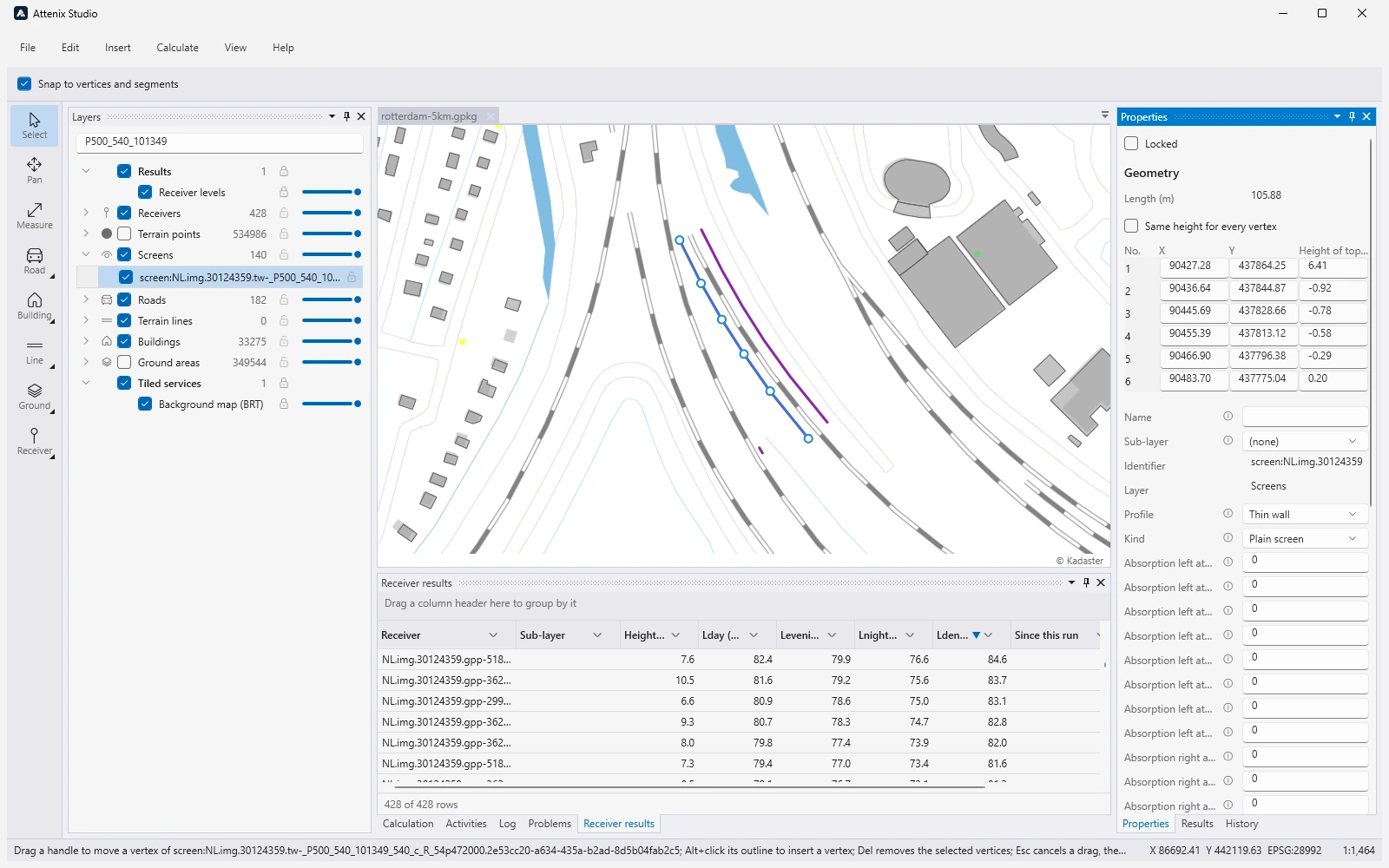
    Selecting an object shows its attributes in the Properties panel, with the unit and meaning of each column. Every edit is a step in the History panel that can be undone, and an edit journal recovers unsaved work after a crash. In progress: the coordinates and height of every vertex in the Properties panel, vertex handles on the map, and drawing tools per kind of object (road, building, screen, receiver).

    A screen selected in Attenix Studio: the map zoomed in on a road with the screen drawn in blue with its vertex handles, the screen highlighted in the Layers panel, and the Properties panel with its length, the X, Y and height of the top of each of its six vertices, its profile (thin wall), kind (plain screen) and absorption per octave band
    Study rotterdam-5km around Kleinpolderplein: a screen with its geometry in the Properties panel, development build, 2026-10-03.
  3. See all objects of a kind side by side

    In progress

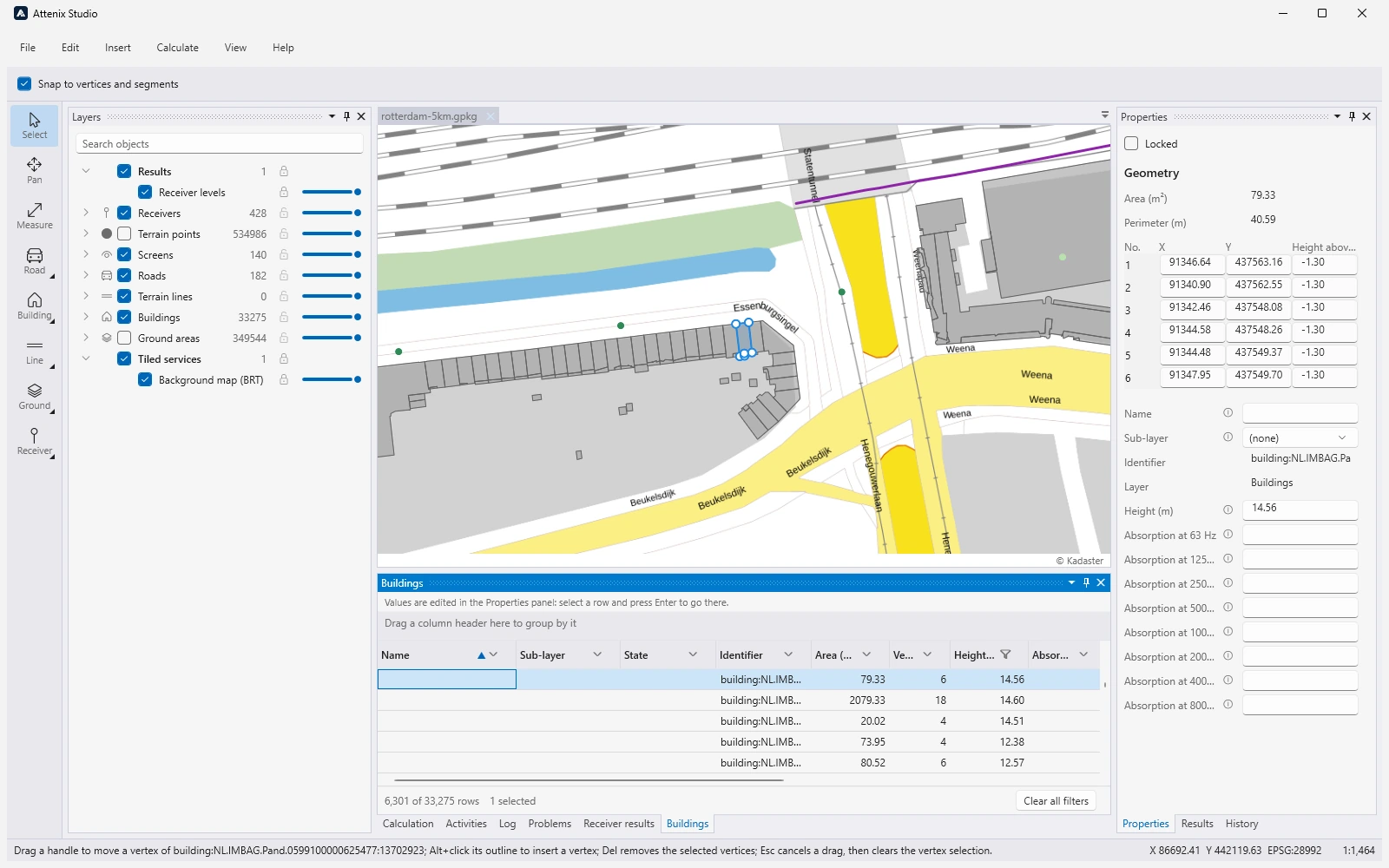
    An object table lists every object of a layer in one data grid, with a filter under every column, sorting and grouping from the header, and export to CSV. A reviewer can sort all receivers by height or all buildings by their height and find the odd one out; the table and the map share the selection.

    The Buildings table under the map in Attenix Studio, filtered to a height above 10 m: 6 301 of 33 275 rows, with columns for name, sub-layer, state, identifier, area, vertices, height and absorption; the selected building is framed on the map and its vertices and height are shown in the Properties panel
    Study rotterdam-5km around Kleinpolderplein: the buildings filtered to a height above 10 m, development build, 2026-10-03.
  4. Check before calculating

    In progress

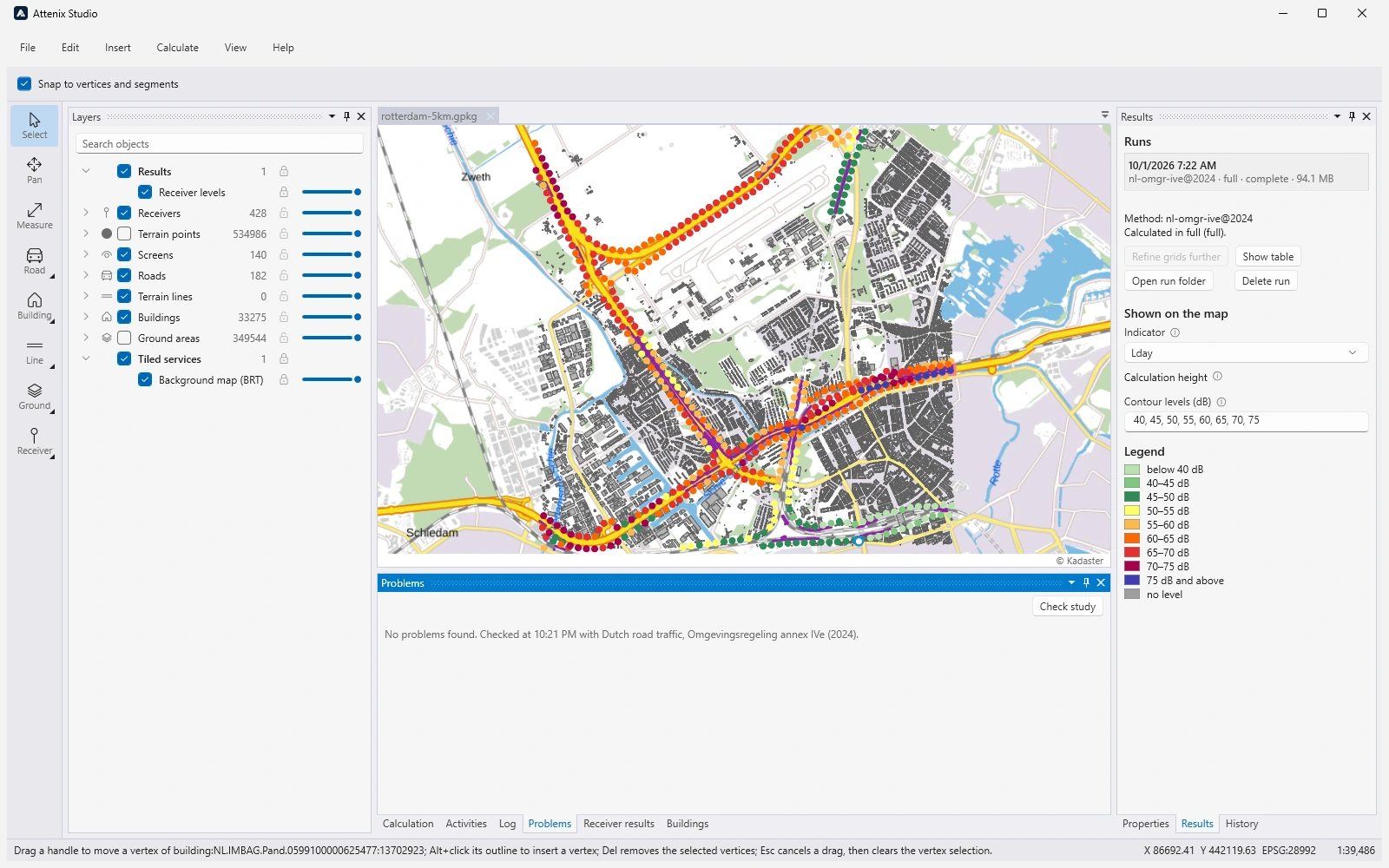
    Check study (F7) checks the study as it is, unsaved edits included, without calculating it and without changing the file. The Problems panel lists each problem with its severity and the object it concerns; a double-click selects and frames that object on the map.

    The Problems panel of Attenix Studio after Check study, reading: No problems found, checked with Dutch road traffic, Omgevingsregeling annex IVe (2024); above it the map of the Rotterdam study with its receivers coloured by level, and the Results panel with the legend on the right
    Study rotterdam-5km around Kleinpolderplein: Check study finds no problems in this study, development build, 2026-10-03.
  5. Calculate

    Built

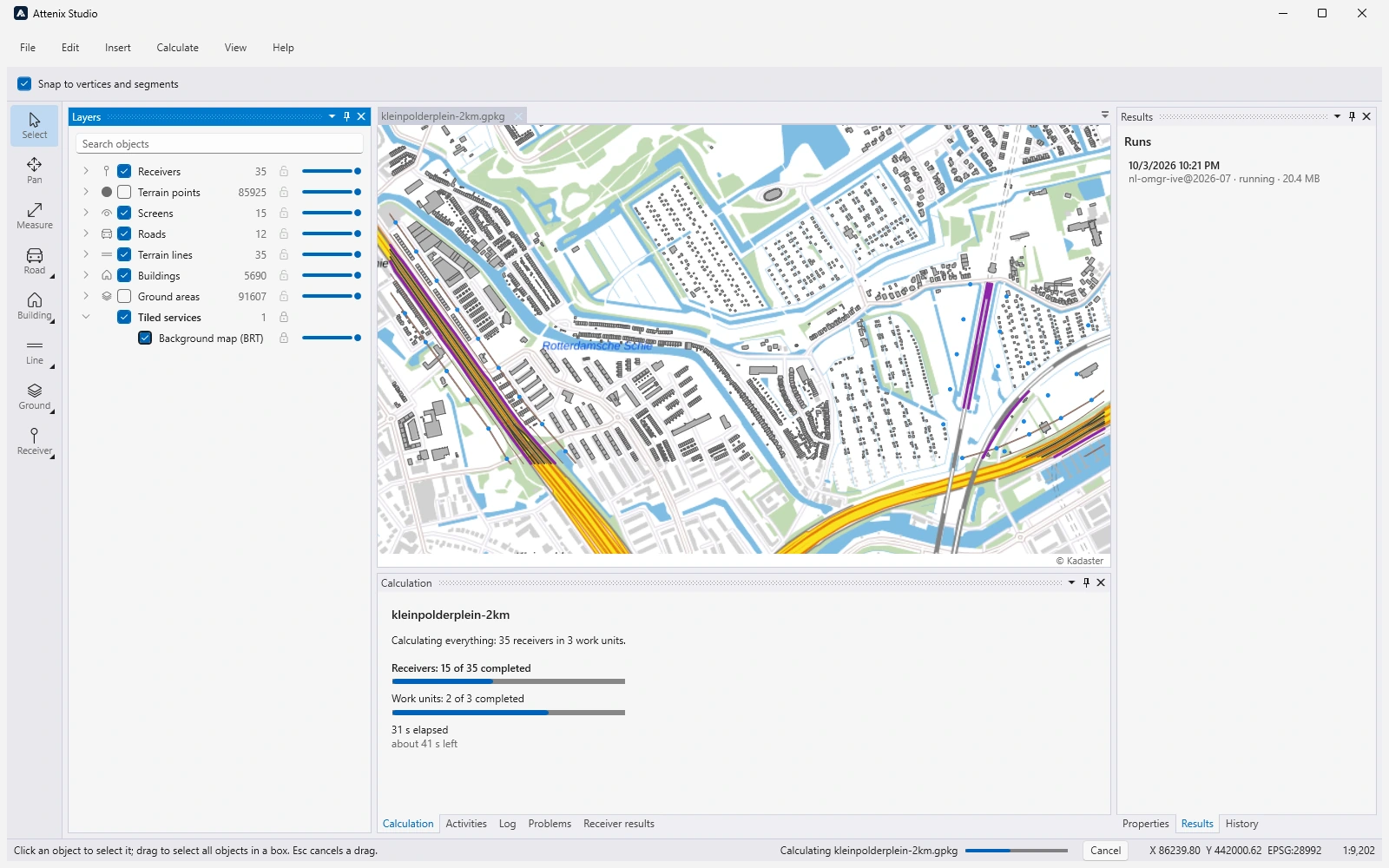
    Calculate (F5) runs the engine in a separate worker process, so the application stays usable. The Calculation tab shows the plan and the progress of receivers, work units and receiver grids, and a run can be cancelled. After an edit, incremental recalculation redoes only what the edit affects.

    The Calculation tab of Attenix Studio during a run: calculating everything, 35 receivers in 3 work units; progress bars at 15 of 35 receivers and 2 of 3 work units completed; 31 s elapsed, about 41 s left; a Cancel button in the status bar; above it the map of the Kleinpolderplein study with its roads and receivers
    Study kleinpolderplein-2km (35 receivers, 12 roads, 5 690 buildings) during a calculation with nl-omgr-ive@2026-07, development build, 2026-10-03.
  6. Review the results

    Built map, contours, legend, runs · In progress contributions per source

    The results show on the map with a legend: receivers coloured by their level and contours of receiver grids. The Results panel lists the runs, and every run is kept next to the study with its manifest, so it can be opened again later. In progress: the levels of a receiver at every height with the contribution of each source, marks on receivers that changed since the run, and CSV export of the receiver results.

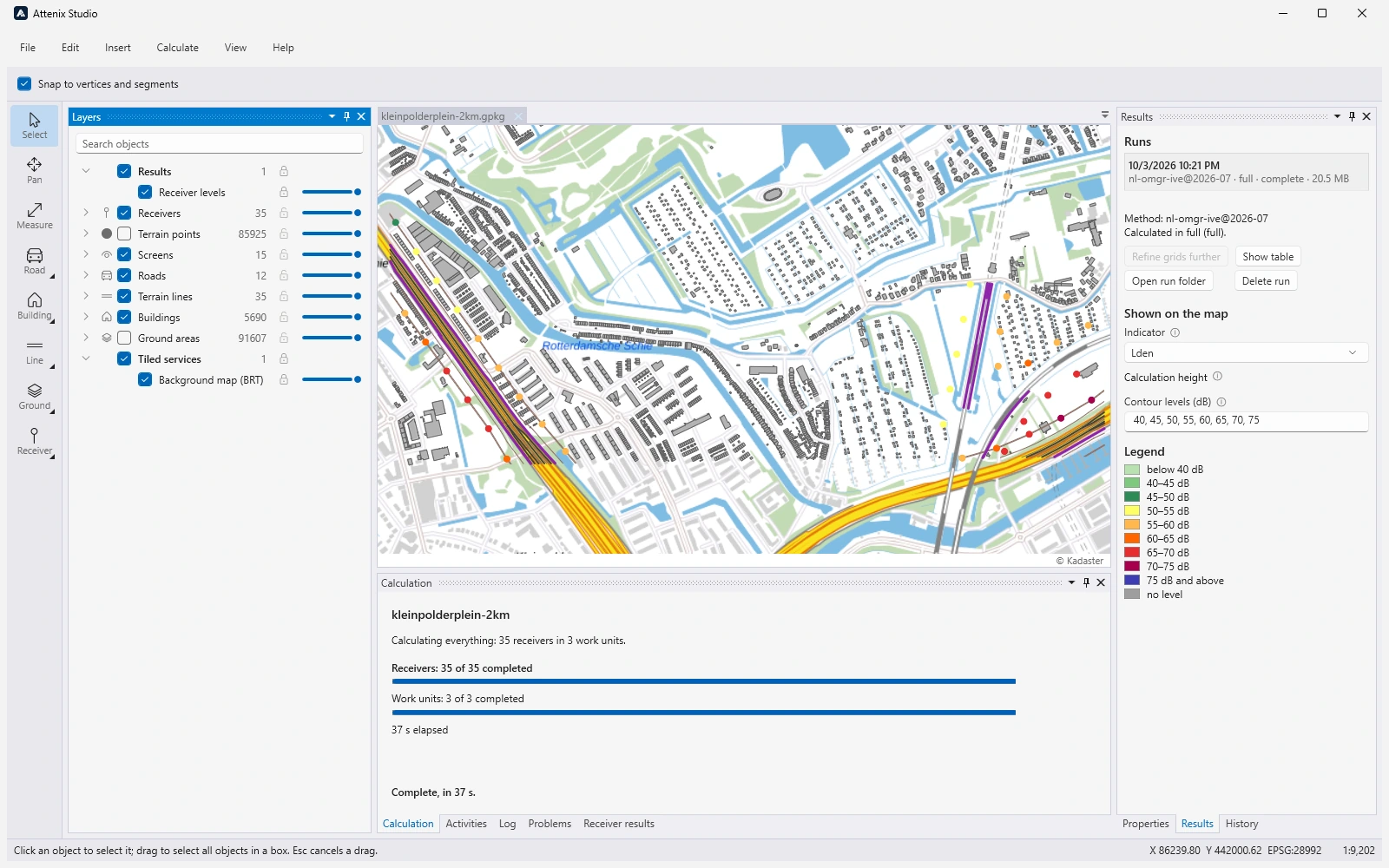
    Attenix Studio after the calculation of the Kleinpolderplein study: the receivers on the map coloured by their Lden, the Calculation tab reading Complete, in 37 s, and the Results panel with the run, the indicator Lden and the legend from below 40 dB to 75 dB and above
    Study kleinpolderplein-2km after the calculation: its receivers coloured by Lden. The study has no receiver grid, so the image shows no contours. Development build, 2026-10-03.
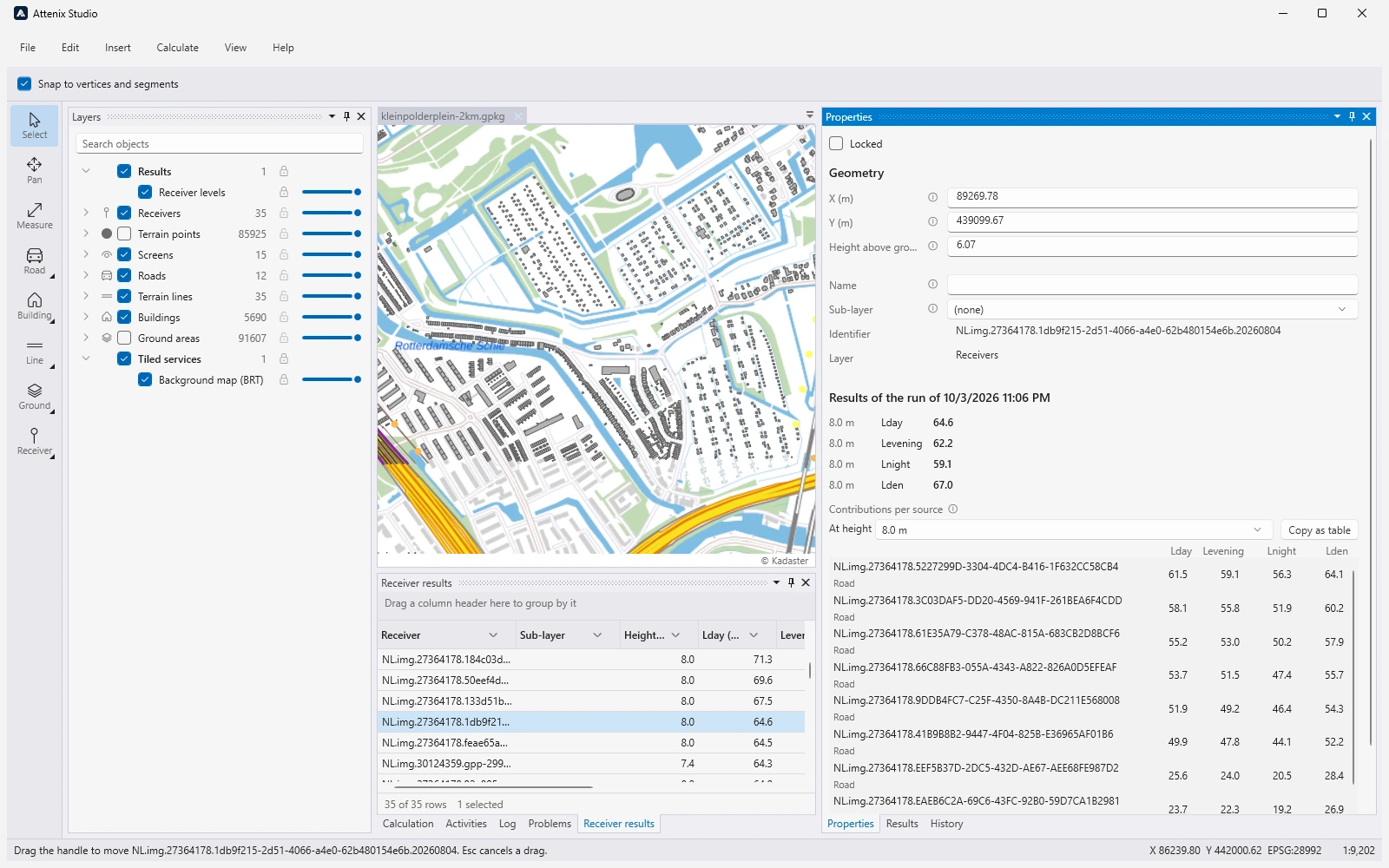
    A receiver selected in the Receiver results table of Attenix Studio; the Properties panel shows its position and height, its Lday, Levening, Lnight and Lden at 8,0 m, and a table of the contributions per source, one road lane per row with its four levels
    Study kleinpolderplein-2km: a receiver’s levels and the contribution of each road lane, development build, 2026-10-03. The contributions per source are in progress (see above).

Studio has a light and a dark theme, and keeps its settings, workspaces and logs per user.

Built for speed

Exact and fast are not a trade-off in Attenix. Speed comes from how the calculation is organised, not from shortcuts in the method: the results are the same to the bit on one thread or on all of them.

  • Every core: receivers are grouped into independent work units that run in parallel, and the per-path formulas run in SIMD instructions. Emission is calculated once per work unit, and the scene’s spatial index and terrain once per calculation.
  • Only what changed: after an edit, incremental recalculation redoes only the receivers whose paths the edit can reach; a change of traffic only sums again. In a dense district, 95 receivers were updated after a traffic change in 0,87 s instead of 19 s for a full calculation.
  • Kept fast: benchmarks of every hot path and of end-to-end reference scenes run against a stored baseline; a change that makes a reference scene more than 10 % slower is reported as a regression.
Indicative calculation times, measured on 2026-09-28 on a 6-core desktop processor (Intel Core i7-8700, 12 threads) with synthetic scenes on flat ground
SceneMethodTime per receiverReceivers per minute
A road of two lanes, 2 km long, with 30 buildings Bijlage IVe, one reflection 0,84 ms about 70 000
A dense district of 1 km² with 50 lanes and 200 buildings Bijlage IVe, one reflection 27 to 40 ms about 1 500 to 2 200
The same district Bijlage IVe, no reflections 11,5 ms about 5 000

Times depend strongly on the scene: most of the time goes into finding the paths, and reflections in a dense scene make up most of that. These are measurements on one machine, not guarantees.

Not in the first release

So that nobody plans around a feature that does not exist yet:

  • Other sources: emission is implemented for road traffic only; rail, industry and aircraft are not covered.
  • RMG 2012: the method before the Omgevingswet is planned, not available.
  • Bijlage XXXIII for 2027: cnossos-eu.road.nl@2027 follows a proposal, not a text in force.
  • Release terms: the release date, licensing and prices are not yet announced.

Hear about the release

Write to us to hear when Attenix and Attenix Studio are released, to discuss the methods they implement and the readings in the interpretation registers, or to ask about the documents a reviewer receives. Tell us which methods you calculate and what size of study you work on, so that we know what matters to you.

Write to info@acrotron.com